Your books, your model, your Mac.
Say what happened and a model running on your own Mac puts it in your books, under the same rules as saybooks.io. Your iPhone asks from anywhere. Nothing goes to an AI company, because there isn't one in the loop.
In your Applications folder the app is called hostel. Free while it is new; signed and notarized by Apple.
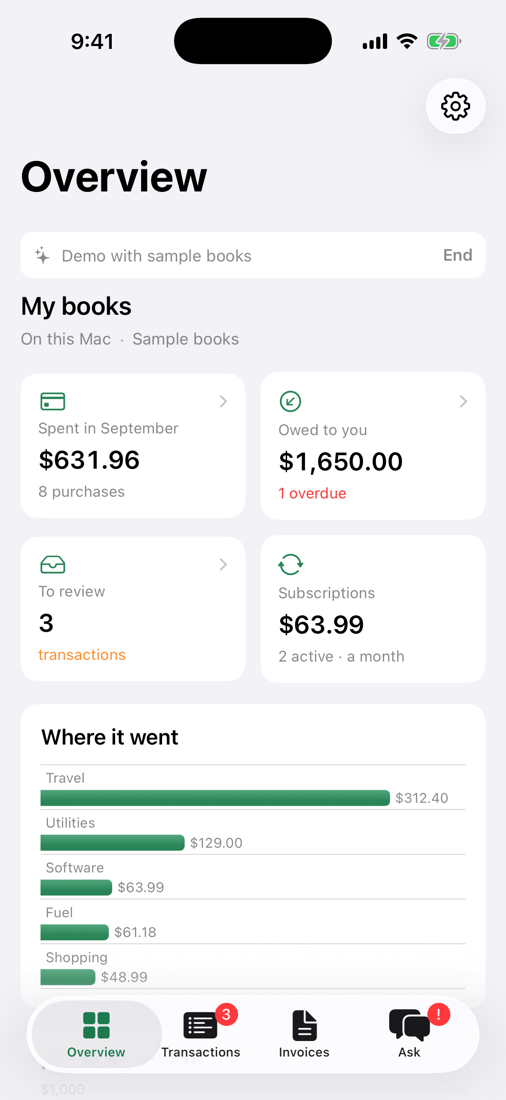
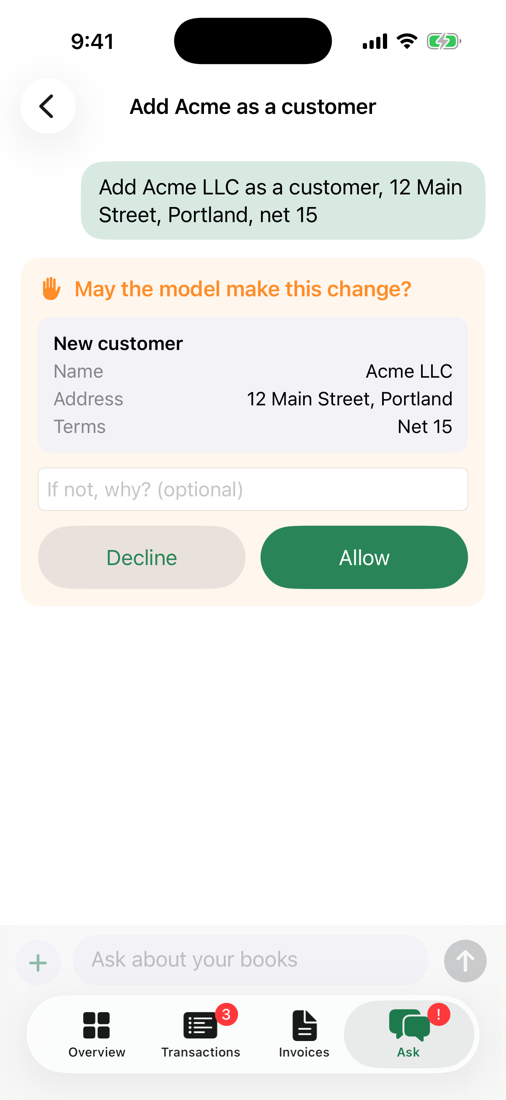
Your data stays on this Mac: the books, the documents, and what you type or attach. The model runs here too, so what it reads and writes stays here as well.
With the iPhone app, everything travels sealed through your own iCloud account. Apple carries it and cannot open it; only your Mac and your phone hold the keys. A photo you take on the phone is read on the phone, and only its words go to your Mac.
The one thing that goes out is a web search, if you turn it on, and the app says the same about that switch: the model's search queries and the pages it reads go out to the internet; your books, your files and what you type do not.
A Mac that does the work, a phone that asks
Three pieces, all yours. No account with us is needed for any of them.
Your Mac keeps the books
The app runs a model on the Mac itself, through the free Ollama, and keeps your books in a Saybooks that lives on the Mac. It can also work on books you keep on saybooks.io, if you want both.
Your iPhone pairs once
Scan a code the Mac shows. From then on, ask from anywhere: what did I spend on software, who owes me, import this statement. The overview, transactions and invoices are there even offline.
They talk, sealed
Messages go through the private iCloud database of your own Apple account, sealed with keys only the two devices hold. The Mac needs to be on for the phone to get answers.
Everything Saybooks does, on your desk
The same books and the same rules as saybooks.io: a wrong entry is refused whichever model is typing, and every act is on a record you can read.
You approve changes
Turn on ask-before-changes and every write waits for your Allow, shown as a small form with the money and terms in words. Decline, and say why if you like.
An inbox folder
Choose a folder. Drop a bank statement or a receipt into it and a card offers to import it. Once it lands in the books, the file moves to a done folder.
Reads PDFs and photos
Statements, invoices and receipts are read on the Mac, columns and all. The statement lands whole or not at all, reconciled to its printed balances.
A model that fits your Mac
The app looks at your Mac's memory and picks the model to match, then downloads it with a progress bar. You never pick a file or a port.
Conversations that carry on
Close the app and pick up tomorrow where you left off. Copy an answer, save a transcript, or start fresh with one key.
Other tools, too
Saybooks is the first thing it talks to, not the only one. Any MCP server you already use can sit beside your books.
What you need
- A Mac with Apple silicon, on macOS 14 or later.
- 16 GB of memory or more. A 16 GB Mac runs a smaller model; from 24 GB the larger one, and 32 GB is comfortable.
- About 18 GB of disk for the model.
- Ollama, a free download, which the app points you to on first run.
- For the iPhone app: an iPhone on the same iCloud account as the Mac.
Installing
- Download the zip and open it.
- Drag hostel to Applications.
- Open it. Gatekeeper names the developer as Crankk Inc; that is the company the app is signed and notarized under.
- On the first run the app asks for Ollama, then downloads the model itself and shows how far along it is.
Bring your books down
Export your books on saybooks.io as one file, open the empty books on your Mac, and choose that file. Everything comes along: the history, the audit trail, every refusal. Going the other way works the same.
Where it stands. The Mac app is at version 0.2, free and notarized. The iPhone app, and the Mac update that pairs with it and brings books in from saybooks.io, are still in the works; this page will say when they are out.
The Mac app will become a paid app later. What you record in it stays yours on every version: export takes everything, any day.